Skip to content
nowrap.ai

The handbook · 17 tools verified

The directory ofAI tools thatactually do the job.

A handpicked guide for working professionals — teachers, lawyers, clinicians, marketers — written by humans who’ve used the things.

We don’t list every chatbot. We test them, vet privacy, check whether they’re still maintained, and write down whether they’re worth your Tuesday afternoon.

17
Tools indexed
10
Professions covered
100%
With privacy policies on file
Beta
Currently in editorial preview
OpenAI previews GPT-5.6 Sol, Terra, and Luna with stronger coding and cyber benchmarksNetflix accidentally shipped its CLAUDE.md instructionsOpenAI and Broadcom unveil Jalapeño, a custom chip built for LLM inferenceAnthropic launches Claude Tag, an AI teammate that lives in your SlackSpaceX moves to buy Cursor in $60B stock dealClaude Fable 5's system prompt leaked. Here's what we could verify.Anthropic pulls Fable 5 after US orderOpenAI adds reset banking for Codex usersAnthropic releases Claude Fable 5 and Mythos 5OpenAI Codex Sites turns prompts into hosted appsASUS just turned ProArt into an RTX Spark AI workstationAnthropic ships Opus 4.8 with Dynamic WorkflowsGoogle makes Gemini 3.5 Flash the fast path across more AI surfacesGoogle introduces Gemini Spark, a 24/7 personal AI agentMicrosoft puts an AI legal agent inside Word for contract reviewNotion is turning its workspace into a hub for AI agentsGoogle unveils Googlebook, a laptop built around GeminiOpenAI launches Daybreak to push AI deeper into cybersecurity workflowsGrey-market resellers in China are offering cut-rate ChatGPT and Claude accessOpenAI launches GPT-Realtime-2 and new voice models for live AI appsAnthropic launches finance agent templates and Microsoft 365 integrationsGoogle rolls out Gemini 3.1 Flash Live Preview for voice-first AIxAI rolls out Grok 4.3 with longer context and stronger agent workflowsAnthropic pushes Claude deeper into creative work with new tool connectorsAmazon launches Quick desktop app, an AI assistant that works across files, apps, and team workflowsOpenAI lands on AWS with Bedrock model access, Codex, and managed agentsGoogle pushes Gemma 4 toward local agent workflows with stronger on-device skillsCursor agent powered by Claude deletes PocketOS production database in secondsOpenAI releases GPT-5.5 and GPT-5.5 Pro, weeks after 5.4Vercel discloses security incident: employee account compromised via third-party AI toolAnthropic ships Claude Opus 4.7 with stronger coding, agents, and visionOpenAI previews GPT-5.6 Sol, Terra, and Luna with stronger coding and cyber benchmarksNetflix accidentally shipped its CLAUDE.md instructionsOpenAI and Broadcom unveil Jalapeño, a custom chip built for LLM inferenceAnthropic launches Claude Tag, an AI teammate that lives in your SlackSpaceX moves to buy Cursor in $60B stock dealClaude Fable 5's system prompt leaked. Here's what we could verify.Anthropic pulls Fable 5 after US orderOpenAI adds reset banking for Codex usersAnthropic releases Claude Fable 5 and Mythos 5OpenAI Codex Sites turns prompts into hosted appsASUS just turned ProArt into an RTX Spark AI workstationAnthropic ships Opus 4.8 with Dynamic WorkflowsGoogle makes Gemini 3.5 Flash the fast path across more AI surfacesGoogle introduces Gemini Spark, a 24/7 personal AI agentMicrosoft puts an AI legal agent inside Word for contract reviewNotion is turning its workspace into a hub for AI agentsGoogle unveils Googlebook, a laptop built around GeminiOpenAI launches Daybreak to push AI deeper into cybersecurity workflowsGrey-market resellers in China are offering cut-rate ChatGPT and Claude accessOpenAI launches GPT-Realtime-2 and new voice models for live AI appsAnthropic launches finance agent templates and Microsoft 365 integrationsGoogle rolls out Gemini 3.1 Flash Live Preview for voice-first AIxAI rolls out Grok 4.3 with longer context and stronger agent workflowsAnthropic pushes Claude deeper into creative work with new tool connectorsAmazon launches Quick desktop app, an AI assistant that works across files, apps, and team workflowsOpenAI lands on AWS with Bedrock model access, Codex, and managed agentsGoogle pushes Gemma 4 toward local agent workflows with stronger on-device skillsCursor agent powered by Claude deletes PocketOS production database in secondsOpenAI releases GPT-5.5 and GPT-5.5 Pro, weeks after 5.4Vercel discloses security incident: employee account compromised via third-party AI toolAnthropic ships Claude Opus 4.7 with stronger coding, agents, and vision
Dispatch

§ This issue

Featured tools.

All 17 tools →
01FeaturedFreemium

Marketers · Researchers

Amazon Quick.

An AI assistant for workplace workflows.

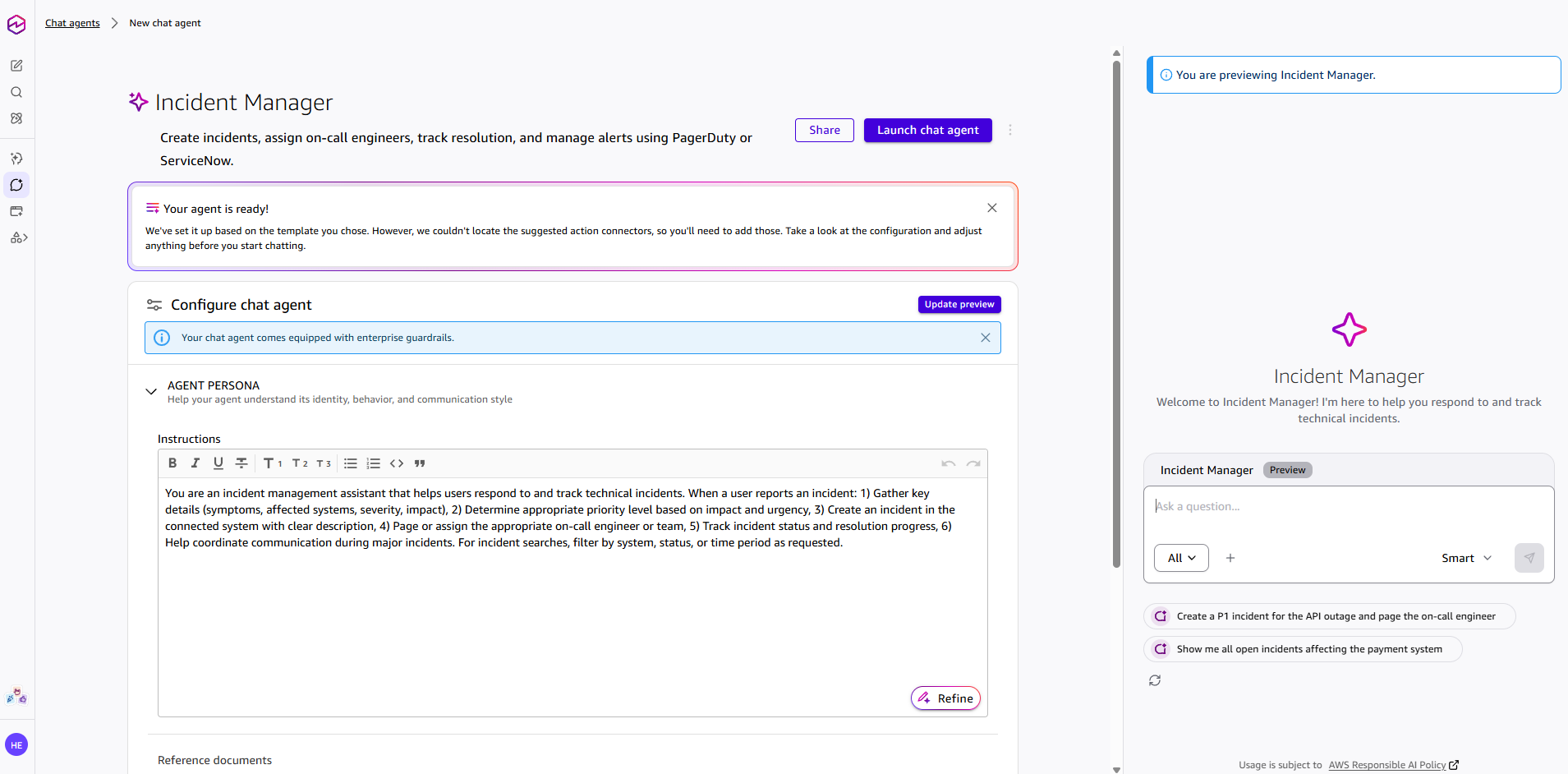
We think Amazon Quick is one of the more interesting enterprise AI assistants we have tested because it feels designed as a real workplace system rather than just a chatbot with extra branding. The account setup is straightforward if you already have an AWS-linked workflow, and the product makes a strong first impression with a cleaner, more approachable interface than some of the more technical AI tools in the market. The biggest strength is how much Amazon Quick tries to expose work context directly inside the product. It offers more visible connectors than Claude in our testing, supports artifacts in a way that feels familiar to Claude users, and includes built-in views for things like memory and a knowledge graph. That last part is especially useful because it makes the system feel less opaque. Instead of treating memory like a hidden backend feature, Amazon Quick lets you inspect more of the structure from inside the app itself. We also found the product generally pleasant to use. In simple design-generation testing, we asked Amazon Quick to create a lightweight web app concept using Next.js and Framer Motion. The output was decent and usable, even if it did not reach the same quality level we would expect from Claude on the same task. Still, for a free-tier experience, the result was solid enough that we would not dismiss it. The interface also feels more user-friendly than both Claude and Codex for non-technical day-to-day use. For reference, we saved one of the generated design samples here: [Open the sample HTML output](/reviews/amazon-quick/design-sample.html) Another positive is efficiency. Based on our testing, Amazon Quick appeared to use noticeably fewer tokens than Claude Opus 4.7 for similar tasks, which could matter for teams trying to balance capability with cost. The downside is that Amazon does not make the underlying model especially transparent. Instead of clearly showing the exact model, the product emphasizes operating modes like **Fast**, **Balance**, and **Smart**, along with configurable thinking levels such as **Low**, **Medium**, and **High**. That abstraction may help mainstream users, but it gives advanced users less visibility into what they are actually running. Amazon Quick also has multiple built-in chat agents on the web app, which helps it feel more like an agent platform than a single assistant. The built-in templates make it easier to picture team and departmental use cases, especially for operations-heavy or support-heavy workflows. ![Amazon Quick built-in chat agents interface](/reviews/amazon-quick/chat-agents.png) The main weakness is remote control. Unlike Claude Code or OpenClaw-based setups, Amazon Quick does not give us a clear path to control the system remotely through mobile-friendly external channels like Telegram, WhatsApp, or Discord. That limits its usefulness for users who want a persistent agent they can drive from outside the desktop environment. In other words, Amazon Quick feels strong as a workplace assistant inside its own product boundary, but weaker as a flexible agent you can route through your own broader automation stack. **Strengths**: More visible connectors than Claude, cleaner and more user-friendly interface, built-in memory and knowledge-graph visibility, artifact support, lower apparent token usage than Claude Opus 4.7 in our testing, multiple built-in chat agents, strong enterprise assistant positioning. **Weaknesses**: No remote-control mode through external messaging channels, weaker design-generation output than Claude in our test, limited transparency about the exact underlying model, and some enterprise-style abstraction that may frustrate power users. **Final verdict**: Amazon Quick feels like a serious contender in the agentic workplace AI category. We do not think it beats Claude on pure output quality in every case, but it is easier to use than Claude and Codex in some day-to-day scenarios, and its visibility into memory, graph structure, and enterprise context makes it stand out. If Amazon expands flexibility and remote-control options, this could become one of the strongest enterprise AI assistants in the market. Even now, we think it is already one of the better agentic AI products outside Claude and Codex.
  • Research
  • Workflow automation
  • Team collaboration
  • Document drafting
  • Knowledge work
Privacy policy on fileReviewed May 11, 2026 by Nowrap
02FeaturedPaid

Lawyers · Researchers

Claude Projects.

A long-context workspace for your work.

Claude Projects is one of Claude’s most useful features for people who work on long-term tasks. Instead of starting a new chat every time, you can create a dedicated project workspace with its own files, instructions, and conversation history. This makes it easier to keep Claude focused on one topic, such as a website, business plan, coding project, research task, or content workflow. The biggest strength is organization. You can upload documents, add project-specific instructions, and keep related conversations in one place. This is very helpful when you want Claude to understand your brand, writing style, technical setup, or project goals without repeating the same context again and again. The weakness is that Claude Projects is not perfect for every workflow. You still need to guide Claude clearly, and it may not always remember or use every uploaded detail exactly the way you expect. For complex coding tasks, Claude Code may be better because it is more focused on working directly with codebases. **Strengths**: Great for long-term work, organized workspace, useful file knowledge, custom instructions, strong for content, research, planning, and project-based workflows. **Weaknesses**: Still needs clear prompting, can miss details from uploaded files, not as powerful as Claude Code for advanced coding workflows. **Final verdict**: Claude Projects is a strong productivity feature for anyone who uses AI regularly. It is best for keeping work organized, giving Claude consistent context, and managing ongoing projects without starting from zero every time.

  • Long-document analysis
  • Knowledge work
  • Team collaboration
Privacy policy on fileReviewed Apr 26, 2026 by Nowrap
03FeaturedFree

Doctors

DoxGPT.

Free AI for verified US clinicians.

DoxGPT is Doximity’s AI assistant for clinicians. It focuses on clinical reference, charting/admin support, patient education, summaries, letters, prior authorizations, and evidence-based medical Q&A. Doximity says it is HIPAA-compliant, free for verified U.S. physicians, NPs, PAs, pharmacists, podiatrists, CRNAs, and medical students, and allows PHI in prompts under encrypted HIPAA-compliant protocols. DoxGPT is an AI assistant built for healthcare professionals, especially doctors and clinicians who need quick help with medical questions, patient communication, summaries, documentation, and admin tasks. Unlike general AI chatbots, it is designed around clinical workflows and is part of the wider Doximity platform. Based on public user feedback, its biggest strength is speed and convenience. Some clinicians say they use it because it gives quick, well-formatted answers and fits nicely with other Doximity tools like Dialer, Scribe, fax, and messaging. It is also positioned as HIPAA-compliant, which is important for medical use. The weakness is that it should still be used carefully. Some users prefer alternatives like OpenEvidence for deeper or more accurate article-based answers. There is also limited independent validation available, so DoxGPT should not replace clinical judgment or trusted medical references. **Strengths**: Fast answers, clinician-focused workflow, HIPAA-focused design, useful for summaries and patient-facing content. **Weaknesses**: Needs human review, limited independent accuracy validation, may not be the best tool for complex clinical decisions. **Final verdict**: DoxGPT is a strong AI tool for healthcare professionals who want a fast and practical assistant for everyday clinical and admin tasks. It is best used as a productivity booster, not as a standalone medical decision-maker.

  • Medical Q&A
  • Clinical writing
  • Research lookup
Privacy policy on fileReviewed Apr 26, 2026 by Nowrap
04FeaturedPaid

Lawyers

Harvey.

AI for legal and professional services teams.

We think Harvey is a serious legal AI platform, but it is clearly built for large firms and enterprise teams rather than solo lawyers or small practices. Public discussion tends to center on its enterprise positioning, big-law adoption, and high-cost, high-touch sales motion. The main strength is that it is shaped around legal workflows instead of generic chat. That makes it more interesting than a plain model wrapper when you need document analysis, drafting help, or research inside a professional services environment with repeatable processes. The weakness is the price and fit. Reddit discussion often describes it as expensive, rigid, and better suited to massive firms than everyday practice, with some users calling out wrapper-like behavior or limited day-to-day value relative to cheaper alternatives. It still needs lawyer review, just like every other AI tool in this category. **Strengths**: Legal workflow focus, strong enterprise orientation, useful for document-heavy legal teams, good fit for repeatable firm processes. **Weaknesses**: Expensive, rigid for smaller teams, still needs careful review, public sentiment is mixed on value. **Final verdict**: We think Harvey looks strong if you are a well-resourced legal or professional services team with serious workflow needs. If you are smaller or budget-sensitive, the fit is much less convincing.

  • Document analysis
  • Legal research
  • Workflow agents
Privacy policy on fileReviewed Apr 28, 2026 by Nowrap

§ Quote of the day

§ Find by profession

Built for your desk.

Every tool tagged by who it’s actually useful for — vetted by people who do that job. Pick a profession to see the shortlist.

§ Also worth knowing

The next shelf.

01Paid

Doctors

Abridge.

Enterprise AI for clinical conversations.

We think Abridge is one of the more credible AI scribe tools in healthcare because it is built around real clinical encounters rather than generic note generation. The public evidence points to strong enterprise adoption, and the product is clearly aimed at reducing documentation burden for clinicians. The main strength we see is workflow fit. It records the conversation, creates a transcript, and gives clinicians something to review before signing, which is exactly what busy health systems want. The public material and user discussions also suggest it is especially useful when the organization wants a serious ambient documentation layer instead of a consumer chatbot. The weakness is that it is not a casual tool. Access is usually enterprise-driven, and the product still depends on careful human review, policy approval, and integration with clinical systems. It also has the normal AI-scribe limitation: it can help a lot, but it cannot be treated as the final source of truth. **Strengths**: Strong clinical workflow fit, good note-generation focus, enterprise adoption, useful review-before-signoff model. **Weaknesses**: Enterprise-first, not broadly accessible, still needs clinician review, limited value outside healthcare. **Final verdict**: Our read is that Abridge is a strong choice for hospitals and clinics that want to cut documentation time without giving up oversight. It is not the tool we would reach for outside medical settings, but in its lane it appears genuinely useful.

  • Clinical notes
  • Ambient scribe
Privacy policy on fileReviewed Apr 28, 2026 by Nowrap
02Freemium

Doctors · Researchers

Consensus.

AI-powered search for academic papers.

We like Consensus when the question is "what does the literature say?" rather than "what does the internet think?" It is built around peer-reviewed sources, citations, and research workflows, so it is much better for academic searching than a normal chatbot. The biggest strength is that it gives us a fast, citation-backed first pass. That makes it handy for students, researchers, and anyone who needs to scan a topic quickly before opening the original papers. The search modes and paper summaries are the point of the product. The weakness is that it is still not a substitute for a systematic review or subject-matter judgment. It can compress nuance, and it only helps if the answer lives in the paper corpus. For formal work, the original sources still matter more than the summary. **Strengths**: Citation-grounded research, multiple search modes, quick literature review, good for overview and fact-checking. **Weaknesses**: Not a replacement for deep academic review, can flatten nuance, only useful when the answer is in the paper corpus. **Final verdict**: We see Consensus as an excellent first-pass research engine for students and researchers, but we would still verify important conclusions in the original papers.

  • Literature search
  • Evidence summary
Privacy policy on fileReviewed Apr 28, 2026 by Nowrap
03Freemium

Engineers

Cursor.

An AI-first IDE.

We think Cursor has become one of the standout AI-first code editors because it combines a VS Code-like workflow with codebase awareness and agentic editing. It feels like a real dev tool, not just a chatbot bolted onto a browser tab. The biggest strength is that it sits close to the work. You can ask for edits, refactors, and code search without leaving the editor, and that makes it genuinely useful for everyday development. Public adoption and industry coverage suggest it is one of the clearest winners in the current coding-tool wave. The weakness is the usual one for AI coding tools: it can generate plausible-looking but wrong code, so we still need to inspect the output carefully. It is also part of a fast-moving, crowded category, which means pricing, limits, and product behavior can shift quickly. **Strengths**: Strong editor integration, good for multi-file coding, natural workflow, useful for refactoring and experimentation. **Weaknesses**: Can hallucinate, still needs code review, pricing and behavior can shift quickly. **Final verdict**: Our take is that Cursor is a strong choice for developers who want AI embedded directly in the editor. It works best as a fast coding partner, not as an autopilot.

  • Code generation
  • Refactor
  • Codebase chat
Privacy policy on fileReviewed Apr 28, 2026 by Nowrap
04Freemium

Marketers · Writers

Descript.

Edit audio and video like a doc.

We think Descript is still one of the most practical tools for transcript-first audio and video editing. If you think of it as "edit media like a document," the product makes immediate sense, especially for podcasts and straightforward creator workflows. The biggest strength is convenience. You can cut sections by editing text, clean up filler words, and move from rough recording to something publishable much faster than with a classic timeline editor. That is the core reason people keep using it. The weakness is that it can feel slower and more fragile than traditional editors once the project gets serious. Public user feedback regularly mentions performance and reliability complaints, and it is not the first tool we would choose for high-end production work. **Strengths**: Great transcript editing, fast for podcasts and simple videos, useful AI cleanup features, easy to learn. **Weaknesses**: Can be slow or buggy, less suitable for advanced pro editing, may feel server-dependent. **Final verdict**: We see Descript as a strong tool for creators who care more about speed and simplicity than deep pro editing control. It is best for transcript-first workflows, not high-end finishing.

  • Podcast editing
  • Video editing
  • Transcription
Privacy policy on fileReviewed Apr 28, 2026 by Nowrap
05Paid

Teachers

Diffit.

Differentiated reading materials for any classroom.

We think Diffit is a practical teacher tool for turning content into leveled classroom materials. The strongest public feedback is that it saves time when you need a reading passage, vocab list, and comprehension questions without building everything from scratch. The main strength is differentiation. You can paste in an article, topic, or source and get versions that are easier to read, plus supports for English learners and classroom use. That makes it especially useful for busy teachers who need a fast starting point. The weakness is that the output still needs teacher review. Public reviews and education writeups repeatedly note that some topics need more thorough resources and that it is not a full classroom platform with deep tracking or assessment workflows. **Strengths**: Good for leveled reading, quick classroom scaffolding, helpful for vocabulary and comprehension support. **Weaknesses**: Still needs teacher review, not a full LMS, some topics are less thorough than others. **Final verdict**: We think Diffit is genuinely useful for teachers who need fast differentiation help. It is a good drafting assistant for classroom content, but it should not replace a teacher's judgment.

  • Leveled reading
  • Vocabulary
  • Comprehension questions
Privacy policy on fileReviewed Apr 28, 2026 by Nowrap
06Freemium

Designers · Marketers

Figma Make.

Prompt to working prototype.

We think Figma Make is promising for fast prototyping, but the public feedback is clearly more mixed than the marketing suggests. It is best understood as a design-to-prototype shortcut, not a reliable way to skip product development. The strength is speed. For early ideas, it can turn a prompt into something visual and clickable fast, which is useful for designers and marketers who want to test a direction before spending time on a real build. The weakness is trustworthiness. Reddit users repeatedly complain that the generated code is rough, hard to clean up, and not easy to move into a real production app. It also seems much less compelling once the project becomes data-heavy, complex, or tightly coupled to the rest of Figma. **Strengths**: Fast for prototyping, good for early idea exploration, useful when you want a visual draft quickly. **Weaknesses**: Generated code can be poor, not production-ready, weak fit for complex apps or serious handoff work. **Final verdict**: We see Figma Make as useful for rough prototypes and design exploration. If you need a real app, expect to rebuild most of it yourself.

  • Prototyping
  • Web app generation
Privacy policy on fileReviewed Apr 28, 2026 by Nowrap

§ Tip the editors

Found a tool we’ve missed?
Tell us about it.

We accept community submissions. The bar is simple: real product, real privacy policy, real humans behind it. We’ll do the rest.

Submit a tool