▲ The handbook
AI for Marketers.
Campaign drafts, brand-voice consistency, and competitive research are where AI earns its keep — not the autoplay slop on LinkedIn. We test for actual workflow integration, not demo-day theater.
Featured for marketers.
Marketers · Researchers
Amazon Quick.
An AI assistant for workplace workflows.
We think Amazon Quick is one of the more interesting enterprise AI assistants we have tested because it feels designed as a real workplace system rather than just a chatbot with extra branding. The account setup is straightforward if you already have an AWS-linked workflow, and the product makes a strong first impression with a cleaner, more approachable interface than some of the more technical AI tools in the market. The biggest strength is how much Amazon Quick tries to expose work context directly inside the product. It offers more visible connectors than Claude in our testing, supports artifacts in a way that feels familiar to Claude users, and includes built-in views for things like memory and a knowledge graph. That last part is especially useful because it makes the system feel less opaque. Instead of treating memory like a hidden backend feature, Amazon Quick lets you inspect more of the structure from inside the app itself. We also found the product generally pleasant to use. In simple design-generation testing, we asked Amazon Quick to create a lightweight web app concept using Next.js and Framer Motion. The output was decent and usable, even if it did not reach the same quality level we would expect from Claude on the same task. Still, for a free-tier experience, the result was solid enough that we would not dismiss it. The interface also feels more user-friendly than both Claude and Codex for non-technical day-to-day use. For reference, we saved one of the generated design samples here: [Open the sample HTML output](/reviews/amazon-quick/design-sample.html) Another positive is efficiency. Based on our testing, Amazon Quick appeared to use noticeably fewer tokens than Claude Opus 4.7 for similar tasks, which could matter for teams trying to balance capability with cost. The downside is that Amazon does not make the underlying model especially transparent. Instead of clearly showing the exact model, the product emphasizes operating modes like **Fast**, **Balance**, and **Smart**, along with configurable thinking levels such as **Low**, **Medium**, and **High**. That abstraction may help mainstream users, but it gives advanced users less visibility into what they are actually running. Amazon Quick also has multiple built-in chat agents on the web app, which helps it feel more like an agent platform than a single assistant. The built-in templates make it easier to picture team and departmental use cases, especially for operations-heavy or support-heavy workflows. 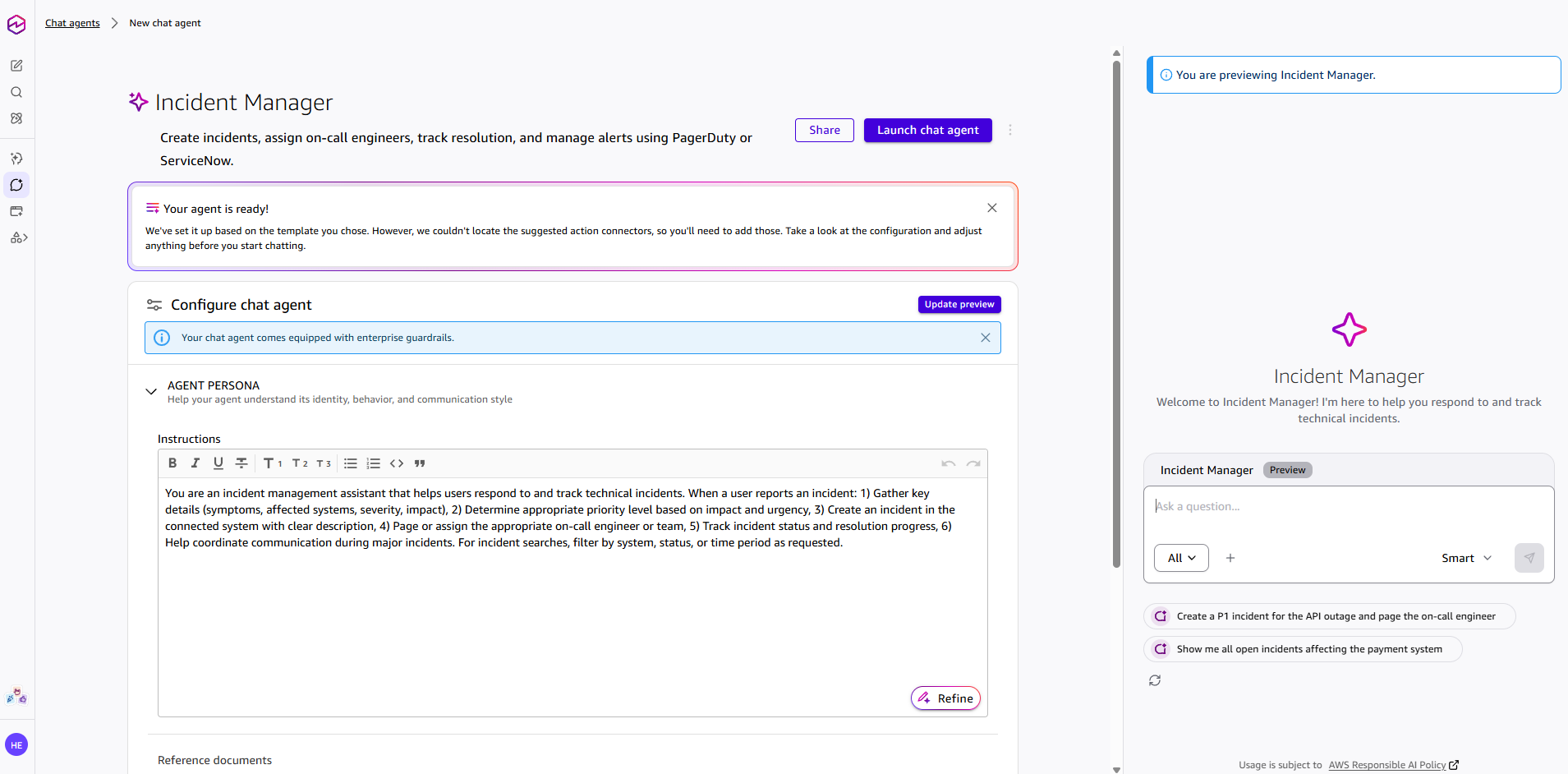 The main weakness is remote control. Unlike Claude Code or OpenClaw-based setups, Amazon Quick does not give us a clear path to control the system remotely through mobile-friendly external channels like Telegram, WhatsApp, or Discord. That limits its usefulness for users who want a persistent agent they can drive from outside the desktop environment. In other words, Amazon Quick feels strong as a workplace assistant inside its own product boundary, but weaker as a flexible agent you can route through your own broader automation stack. **Strengths**: More visible connectors than Claude, cleaner and more user-friendly interface, built-in memory and knowledge-graph visibility, artifact support, lower apparent token usage than Claude Opus 4.7 in our testing, multiple built-in chat agents, strong enterprise assistant positioning. **Weaknesses**: No remote-control mode through external messaging channels, weaker design-generation output than Claude in our test, limited transparency about the exact underlying model, and some enterprise-style abstraction that may frustrate power users. **Final verdict**: Amazon Quick feels like a serious contender in the agentic workplace AI category. We do not think it beats Claude on pure output quality in every case, but it is easier to use than Claude and Codex in some day-to-day scenarios, and its visibility into memory, graph structure, and enterprise context makes it stand out. If Amazon expands flexibility and remote-control options, this could become one of the strongest enterprise AI assistants in the market. Even now, we think it is already one of the better agentic AI products outside Claude and Codex.
- Research
- Workflow automation
- Team collaboration
- Document drafting
- Knowledge work
Lawyers · Researchers
Claude Projects.
A long-context workspace for your work.
Claude Projects is one of Claude’s most useful features for people who work on long-term tasks. Instead of starting a new chat every time, you can create a dedicated project workspace with its own files, instructions, and conversation history. This makes it easier to keep Claude focused on one topic, such as a website, business plan, coding project, research task, or content workflow. The biggest strength is organization. You can upload documents, add project-specific instructions, and keep related conversations in one place. This is very helpful when you want Claude to understand your brand, writing style, technical setup, or project goals without repeating the same context again and again. The weakness is that Claude Projects is not perfect for every workflow. You still need to guide Claude clearly, and it may not always remember or use every uploaded detail exactly the way you expect. For complex coding tasks, Claude Code may be better because it is more focused on working directly with codebases. **Strengths**: Great for long-term work, organized workspace, useful file knowledge, custom instructions, strong for content, research, planning, and project-based workflows. **Weaknesses**: Still needs clear prompting, can miss details from uploaded files, not as powerful as Claude Code for advanced coding workflows. **Final verdict**: Claude Projects is a strong productivity feature for anyone who uses AI regularly. It is best for keeping work organized, giving Claude consistent context, and managing ongoing projects without starting from zero every time.
- Long-document analysis
- Knowledge work
- Team collaboration
Researchers · Writers
Perplexity.
An answer engine with citations.
We think Perplexity is still one of the best tools for quick, sourced web research. When it works well, it gives you a fast answer with citations attached, which is exactly why people keep using it as a search replacement. The biggest strength is speed plus source visibility. It is useful for everyday questions, comparison shopping, and broad research where you want a quick synthesis and links to check afterward. Community discussion still shows that a lot of people rely on it for that exact use case. The weakness is that public sentiment has cooled as the product has changed. Reddit users complain about shifting limits, occasional bugginess, and answers that can feel overconfident or shallow on nuanced topics. It is helpful, but it is not a final authority. **Strengths**: Fast sourced answers, useful for research and comparison shopping, easy to verify claims through citations. **Weaknesses**: Limits and behavior can change, can be buggy, not always deep enough for nuanced work. **Final verdict**: We think Perplexity is still worth using if you want quick sourced answers from the web. We would trust it as a first stop, not as the last word.
- Research
- Source-backed answers
Marketers · Researchers
Workspace Agents in ChatGPT.
Shared AI agents for team workflows.
We think Workspace Agents in ChatGPT is one of OpenAI’s more important product moves for teams, because it pushes ChatGPT beyond one-off chats and toward shared workflow automation. Instead of acting like a personal assistant in a single conversation, it is designed to help teams build reusable agents that can run scheduled, multi-step tasks across connected tools. The biggest strength is the operational angle. Workspace Agents appears more useful for recurring business workflows than for casual AI use, especially if a team already works heavily inside the OpenAI ecosystem. The ability to share agents, connect apps, run tasks on schedules, and add approvals gives it more serious workplace potential than a standard chatbot feature. The weakness is that this still looks like a preview-stage product with enterprise-style promises that may not always translate into smooth real-world execution. Setup quality, connector reliability, permissions, pricing changes, and governance overhead will matter a lot. Teams that want instant, low-friction automation may find that the actual value depends less on the concept and more on how well the workflows are configured and maintained. **Strengths**: Shared team agents, stronger workflow automation angle, scheduled execution, connected tools, approvals and governance controls, more useful for recurring operational work than normal chat. **Weaknesses**: Preview-stage uncertainty, setup and admin complexity, real-world workflow quality may vary, pricing and availability can change, not automatically a smooth fit for every team. **Final verdict**: Workspace Agents in ChatGPT looks promising for teams that want reusable AI workflows inside a business environment. We think it is more compelling as an operations and knowledge-work tool than as a general consumer feature, but we would stay cautious until the product proves it can deliver consistent real-world execution beyond the preview stage.
- Workflow automation
- Knowledge work
- Research
- Team collaboration
The next shelf.
Filter view →Marketers · Writers
Descript.
Edit audio and video like a doc.
We think Descript is still one of the most practical tools for transcript-first audio and video editing. If you think of it as "edit media like a document," the product makes immediate sense, especially for podcasts and straightforward creator workflows. The biggest strength is convenience. You can cut sections by editing text, clean up filler words, and move from rough recording to something publishable much faster than with a classic timeline editor. That is the core reason people keep using it. The weakness is that it can feel slower and more fragile than traditional editors once the project gets serious. Public user feedback regularly mentions performance and reliability complaints, and it is not the first tool we would choose for high-end production work. **Strengths**: Great transcript editing, fast for podcasts and simple videos, useful AI cleanup features, easy to learn. **Weaknesses**: Can be slow or buggy, less suitable for advanced pro editing, may feel server-dependent. **Final verdict**: We see Descript as a strong tool for creators who care more about speed and simplicity than deep pro editing control. It is best for transcript-first workflows, not high-end finishing.
- Podcast editing
- Video editing
- Transcription
Designers · Marketers
Figma Make.
Prompt to working prototype.
We think Figma Make is promising for fast prototyping, but the public feedback is clearly more mixed than the marketing suggests. It is best understood as a design-to-prototype shortcut, not a reliable way to skip product development. The strength is speed. For early ideas, it can turn a prompt into something visual and clickable fast, which is useful for designers and marketers who want to test a direction before spending time on a real build. The weakness is trustworthiness. Reddit users repeatedly complain that the generated code is rough, hard to clean up, and not easy to move into a real production app. It also seems much less compelling once the project becomes data-heavy, complex, or tightly coupled to the rest of Figma. **Strengths**: Fast for prototyping, good for early idea exploration, useful when you want a visual draft quickly. **Weaknesses**: Generated code can be poor, not production-ready, weak fit for complex apps or serious handoff work. **Final verdict**: We see Figma Make as useful for rough prototypes and design exploration. If you need a real app, expect to rebuild most of it yourself.
- Prototyping
- Web app generation
Marketers · Freelancers
Fireflies.
An AI notetaker for your meetings.
We think Fireflies is a solid meeting assistant if your main problem is remembering what was said across lots of calls. It automatically joins meetings, captures transcripts, and makes past conversations searchable, which is exactly the kind of boring utility that can save time. The strength is convenience. The product is useful for teams that want transcripts, summaries, and a central archive of calls without having to manually write notes after every meeting. It also appears to work well enough across the common conferencing tools for the use case it targets. The weakness is that the AI layer is not magic. Public reviews still mention integration flakiness, action-item quality that needs human cleanup, and the basic limitation that speaker overlap or messy meetings can reduce accuracy. Some people also dislike the always-on bot presence. **Strengths**: Good meeting transcripts, useful search across calls, easy to automate note capture, strong basic utility. **Weaknesses**: Action items still need review, integrations can be flaky, speaker attribution can break down in messy meetings. **Final verdict**: We think Fireflies is a good fit for teams that want searchable meeting notes more than fancy meeting intelligence. It is helpful, but not a substitute for paying attention in the meeting.
- Meeting transcripts
- Action items
- Search across calls
Marketers · Writers
Jasper.
An execution platform for marketing teams.
We think Jasper used to be the default name people mentioned for AI marketing writing, and it is still a serious product. The current positioning is broader than simple text generation: it is about workflows, brand consistency, and repeatable marketing execution. The main strength is that it can help teams keep output aligned with a brand voice while reducing the blank-page problem. For marketing orgs that produce a lot of campaigns and need a structured process, that remains a real advantage. The weakness is that public sentiment has cooled. Reddit discussion often treats Jasper as less exciting than it once was, and many users still say the output needs heavy editing or feels generic unless you invest time into the setup. It is also not cheap for what is, at core, still AI-assisted drafting. **Strengths**: Useful for marketing workflows, helpful brand-voice support, good for teams that need repeatable content production. **Weaknesses**: Can sound generic, needs editing, no longer feels category-leading to many users, price is hard to justify for smaller teams. **Final verdict**: We think Jasper is still useful for marketing teams that want structure and consistency. It is not the strongest general writing tool anymore, but it can make sense when workflow matters more than raw model quality.
- Campaign workflows
- Content production
- Brand voice
Marketers · Freelancers
Lavender.
An email coach for sales reps.
We think Lavender is a cold-email coach, not a general writing tool. It lives where sales reps actually work and focuses on improving email quality as you write, which makes it much more practical than a standalone chatbot for outbound teams. The strength is the inline feedback loop. Scoring readability, personalization, and deliverability inside the drafting flow can be genuinely helpful for SDRs and AEs who send a lot of outreach and want quick improvement without guessing. The weakness is that it cannot fix a weak list, a bad offer, or a broken sales motion. It also depends on the buyer being willing to use another layer of software inside the inbox, which is fine for some teams and annoying for others. **Strengths**: Good inline coaching, useful for sales outreach, practical for teams that send lots of cold email. **Weaknesses**: Does not fix bad targeting or weak offers, can feel prescriptive, adds another tool to the inbox workflow. **Final verdict**: We think Lavender is a solid choice for sales teams that want help tightening outbound email. It is useful, but it is not a magic shortcut for poor outreach strategy.
- Cold email
- Sales outreach
From the dispatch.
All news →Netflix accidentally shipped its CLAUDE.md instructions
Jun 26, 2026·4 min readOpenAI and Broadcom unveil Jalapeño, a custom chip built for LLM inference
Jun 24, 2026·5 min readAnthropic launches Claude Tag, an AI teammate that lives in your Slack
Jun 23, 2026·5 min readClaude Fable 5's system prompt leaked. Here's what we could verify.
Jun 17, 2026·5 min readAnthropic pulls Fable 5 after US order
Jun 13, 2026·4 min readAnthropic releases Claude Fable 5 and Mythos 5
Jun 9, 2026·5 min readKey terms.
Full glossary →- AI agentAn AI that doesn't just answer questions but takes a goal, makes a plan, and uses tools to carry it out across multiple steps.
- Few-shot promptingShowing an AI a couple of worked examples in your prompt so it copies the pattern instead of guessing.
- Fine-tuningFurther training a general AI model on your own examples so it adopts a specific style, format, or domain.
- Foundation modelA large, general-purpose AI model trained at huge scale that other tools and products are built on top of.
- Large language modelThe kind of AI — trained on vast amounts of text — that powers chatbots and writing assistants by predicting the next word.
- PromptThe instruction you give an AI — and the single biggest lever you have over the quality of what it gives back.
- TemperatureA setting that controls how predictable or creative an AI's output is — low for consistent, high for varied.
§ More