▲ The handbook
AI for Engineers.
Coding assistants are a saturated category. We focus on the dimensions that actually matter for production work: privacy of your code, depth of context window, integration with your existing toolchain, and what they cost at team scale.
Featured for engineers.
Marketers · Researchers
Amazon Quick.
An AI assistant for workplace workflows.
We think Amazon Quick is one of the more interesting enterprise AI assistants we have tested because it feels designed as a real workplace system rather than just a chatbot with extra branding. The account setup is straightforward if you already have an AWS-linked workflow, and the product makes a strong first impression with a cleaner, more approachable interface than some of the more technical AI tools in the market. The biggest strength is how much Amazon Quick tries to expose work context directly inside the product. It offers more visible connectors than Claude in our testing, supports artifacts in a way that feels familiar to Claude users, and includes built-in views for things like memory and a knowledge graph. That last part is especially useful because it makes the system feel less opaque. Instead of treating memory like a hidden backend feature, Amazon Quick lets you inspect more of the structure from inside the app itself. We also found the product generally pleasant to use. In simple design-generation testing, we asked Amazon Quick to create a lightweight web app concept using Next.js and Framer Motion. The output was decent and usable, even if it did not reach the same quality level we would expect from Claude on the same task. Still, for a free-tier experience, the result was solid enough that we would not dismiss it. The interface also feels more user-friendly than both Claude and Codex for non-technical day-to-day use. For reference, we saved one of the generated design samples here: [Open the sample HTML output](/reviews/amazon-quick/design-sample.html) Another positive is efficiency. Based on our testing, Amazon Quick appeared to use noticeably fewer tokens than Claude Opus 4.7 for similar tasks, which could matter for teams trying to balance capability with cost. The downside is that Amazon does not make the underlying model especially transparent. Instead of clearly showing the exact model, the product emphasizes operating modes like **Fast**, **Balance**, and **Smart**, along with configurable thinking levels such as **Low**, **Medium**, and **High**. That abstraction may help mainstream users, but it gives advanced users less visibility into what they are actually running. Amazon Quick also has multiple built-in chat agents on the web app, which helps it feel more like an agent platform than a single assistant. The built-in templates make it easier to picture team and departmental use cases, especially for operations-heavy or support-heavy workflows. 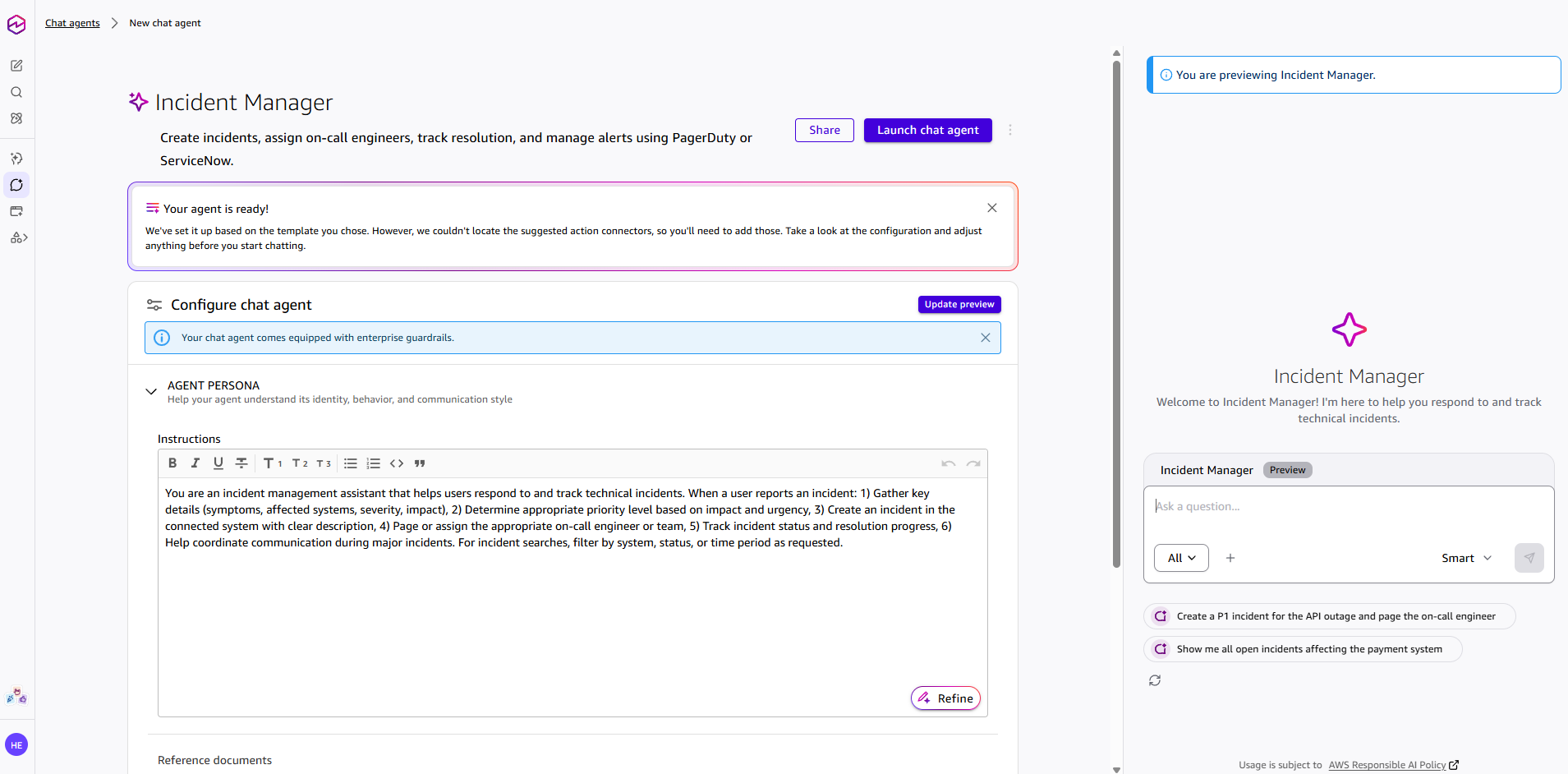 The main weakness is remote control. Unlike Claude Code or OpenClaw-based setups, Amazon Quick does not give us a clear path to control the system remotely through mobile-friendly external channels like Telegram, WhatsApp, or Discord. That limits its usefulness for users who want a persistent agent they can drive from outside the desktop environment. In other words, Amazon Quick feels strong as a workplace assistant inside its own product boundary, but weaker as a flexible agent you can route through your own broader automation stack. **Strengths**: More visible connectors than Claude, cleaner and more user-friendly interface, built-in memory and knowledge-graph visibility, artifact support, lower apparent token usage than Claude Opus 4.7 in our testing, multiple built-in chat agents, strong enterprise assistant positioning. **Weaknesses**: No remote-control mode through external messaging channels, weaker design-generation output than Claude in our test, limited transparency about the exact underlying model, and some enterprise-style abstraction that may frustrate power users. **Final verdict**: Amazon Quick feels like a serious contender in the agentic workplace AI category. We do not think it beats Claude on pure output quality in every case, but it is easier to use than Claude and Codex in some day-to-day scenarios, and its visibility into memory, graph structure, and enterprise context makes it stand out. If Amazon expands flexibility and remote-control options, this could become one of the strongest enterprise AI assistants in the market. Even now, we think it is already one of the better agentic AI products outside Claude and Codex.
- Research
- Workflow automation
- Team collaboration
- Document drafting
- Knowledge work
Marketers · Researchers
Workspace Agents in ChatGPT.
Shared AI agents for team workflows.
We think Workspace Agents in ChatGPT is one of OpenAI’s more important product moves for teams, because it pushes ChatGPT beyond one-off chats and toward shared workflow automation. Instead of acting like a personal assistant in a single conversation, it is designed to help teams build reusable agents that can run scheduled, multi-step tasks across connected tools. The biggest strength is the operational angle. Workspace Agents appears more useful for recurring business workflows than for casual AI use, especially if a team already works heavily inside the OpenAI ecosystem. The ability to share agents, connect apps, run tasks on schedules, and add approvals gives it more serious workplace potential than a standard chatbot feature. The weakness is that this still looks like a preview-stage product with enterprise-style promises that may not always translate into smooth real-world execution. Setup quality, connector reliability, permissions, pricing changes, and governance overhead will matter a lot. Teams that want instant, low-friction automation may find that the actual value depends less on the concept and more on how well the workflows are configured and maintained. **Strengths**: Shared team agents, stronger workflow automation angle, scheduled execution, connected tools, approvals and governance controls, more useful for recurring operational work than normal chat. **Weaknesses**: Preview-stage uncertainty, setup and admin complexity, real-world workflow quality may vary, pricing and availability can change, not automatically a smooth fit for every team. **Final verdict**: Workspace Agents in ChatGPT looks promising for teams that want reusable AI workflows inside a business environment. We think it is more compelling as an operations and knowledge-work tool than as a general consumer feature, but we would stay cautious until the product proves it can deliver consistent real-world execution beyond the preview stage.
- Workflow automation
- Knowledge work
- Research
- Team collaboration
The next shelf.
Filter view →Engineers
Cursor.
An AI-first IDE.
We think Cursor has become one of the standout AI-first code editors because it combines a VS Code-like workflow with codebase awareness and agentic editing. It feels like a real dev tool, not just a chatbot bolted onto a browser tab. The biggest strength is that it sits close to the work. You can ask for edits, refactors, and code search without leaving the editor, and that makes it genuinely useful for everyday development. Public adoption and industry coverage suggest it is one of the clearest winners in the current coding-tool wave. The weakness is the usual one for AI coding tools: it can generate plausible-looking but wrong code, so we still need to inspect the output carefully. It is also part of a fast-moving, crowded category, which means pricing, limits, and product behavior can shift quickly. **Strengths**: Strong editor integration, good for multi-file coding, natural workflow, useful for refactoring and experimentation. **Weaknesses**: Can hallucinate, still needs code review, pricing and behavior can shift quickly. **Final verdict**: Our take is that Cursor is a strong choice for developers who want AI embedded directly in the editor. It works best as a fast coding partner, not as an autopilot.
- Code generation
- Refactor
- Codebase chat
From the dispatch.
All news →Netflix accidentally shipped its CLAUDE.md instructions
Jun 26, 2026·4 min readOpenAI and Broadcom unveil Jalapeño, a custom chip built for LLM inference
Jun 24, 2026·5 min readSpaceX moves to buy Cursor in $60B stock deal
Jun 21, 2026·5 min readClaude Fable 5's system prompt leaked. Here's what we could verify.
Jun 17, 2026·5 min readAnthropic releases Claude Fable 5 and Mythos 5
Jun 9, 2026·5 min readCursor agent powered by Claude deletes PocketOS production database in seconds
Apr 27, 2026·4 min readKey terms.
Full glossary →- AI agentAn AI that doesn't just answer questions but takes a goal, makes a plan, and uses tools to carry it out across multiple steps.
- APIA doorway that lets one piece of software talk to another — how apps and agents plug into an AI model.
- BenchmarkA standardised test used to measure and compare AI models — and a number to read with healthy skepticism.
- Context windowHow much an AI can "hold in mind" at once — the working memory that limits how much it can read or remember in one go.
- EmbeddingA way of turning text into numbers that capture meaning, so an AI can find things by what they mean rather than the words they use.
- Fine-tuningFurther training a general AI model on your own examples so it adopts a specific style, format, or domain.
- Foundation modelA large, general-purpose AI model trained at huge scale that other tools and products are built on top of.
- InferenceThe act of running a trained AI model to get an answer — the step you actually pay for and wait on.
§ More