▲ The handbook
AI for Researchers.
Literature review and synthesis at the speed of a curious afternoon. We track tools that show their work — citations, source links, and confidence calibration — and we flag the ones that confidently hallucinate.
Featured for researchers.
Marketers · Researchers
Amazon Quick.
An AI assistant for workplace workflows.
We think Amazon Quick is one of the more interesting enterprise AI assistants we have tested because it feels designed as a real workplace system rather than just a chatbot with extra branding. The account setup is straightforward if you already have an AWS-linked workflow, and the product makes a strong first impression with a cleaner, more approachable interface than some of the more technical AI tools in the market. The biggest strength is how much Amazon Quick tries to expose work context directly inside the product. It offers more visible connectors than Claude in our testing, supports artifacts in a way that feels familiar to Claude users, and includes built-in views for things like memory and a knowledge graph. That last part is especially useful because it makes the system feel less opaque. Instead of treating memory like a hidden backend feature, Amazon Quick lets you inspect more of the structure from inside the app itself. We also found the product generally pleasant to use. In simple design-generation testing, we asked Amazon Quick to create a lightweight web app concept using Next.js and Framer Motion. The output was decent and usable, even if it did not reach the same quality level we would expect from Claude on the same task. Still, for a free-tier experience, the result was solid enough that we would not dismiss it. The interface also feels more user-friendly than both Claude and Codex for non-technical day-to-day use. For reference, we saved one of the generated design samples here: [Open the sample HTML output](/reviews/amazon-quick/design-sample.html) Another positive is efficiency. Based on our testing, Amazon Quick appeared to use noticeably fewer tokens than Claude Opus 4.7 for similar tasks, which could matter for teams trying to balance capability with cost. The downside is that Amazon does not make the underlying model especially transparent. Instead of clearly showing the exact model, the product emphasizes operating modes like **Fast**, **Balance**, and **Smart**, along with configurable thinking levels such as **Low**, **Medium**, and **High**. That abstraction may help mainstream users, but it gives advanced users less visibility into what they are actually running. Amazon Quick also has multiple built-in chat agents on the web app, which helps it feel more like an agent platform than a single assistant. The built-in templates make it easier to picture team and departmental use cases, especially for operations-heavy or support-heavy workflows. 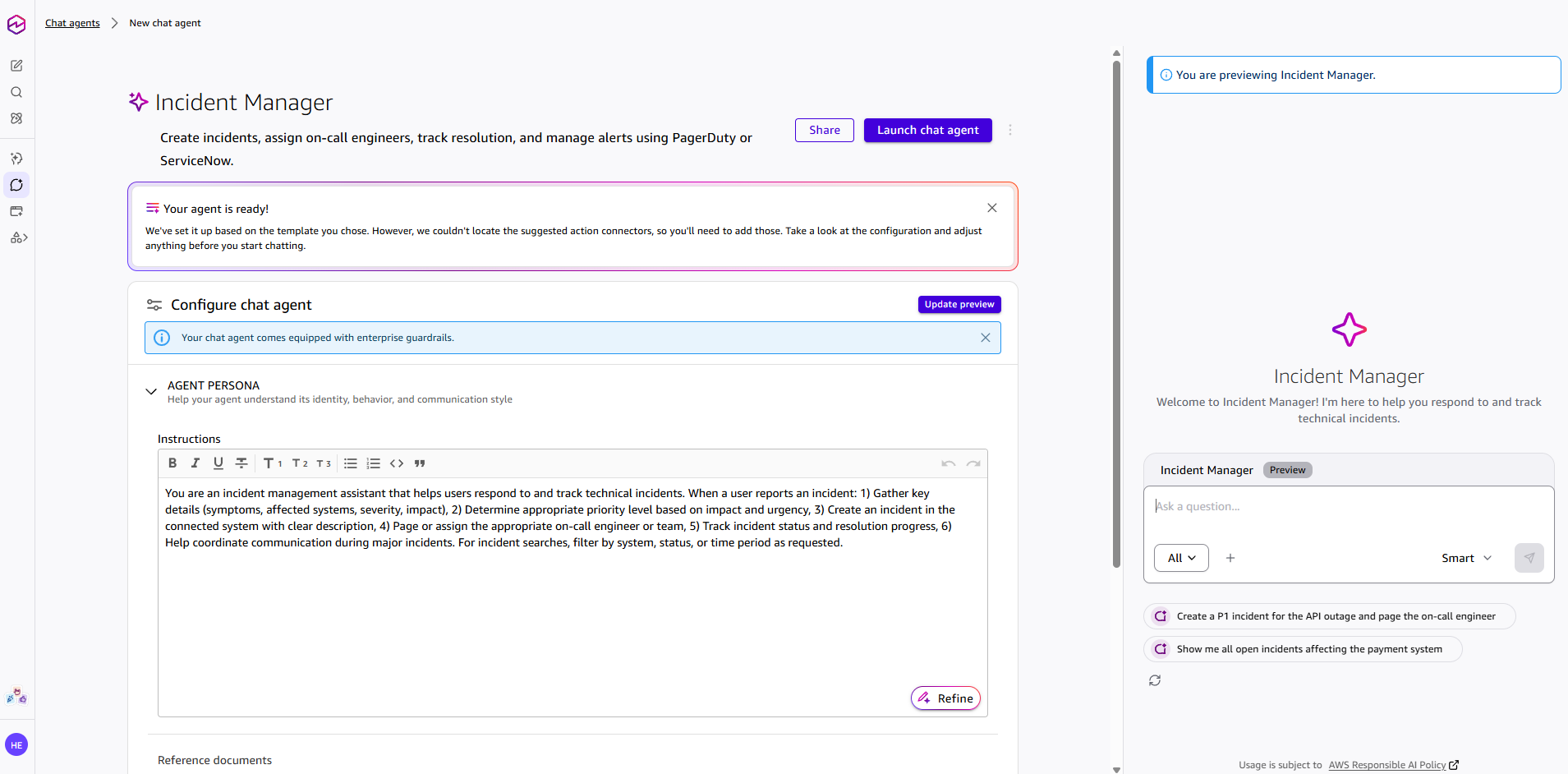 The main weakness is remote control. Unlike Claude Code or OpenClaw-based setups, Amazon Quick does not give us a clear path to control the system remotely through mobile-friendly external channels like Telegram, WhatsApp, or Discord. That limits its usefulness for users who want a persistent agent they can drive from outside the desktop environment. In other words, Amazon Quick feels strong as a workplace assistant inside its own product boundary, but weaker as a flexible agent you can route through your own broader automation stack. **Strengths**: More visible connectors than Claude, cleaner and more user-friendly interface, built-in memory and knowledge-graph visibility, artifact support, lower apparent token usage than Claude Opus 4.7 in our testing, multiple built-in chat agents, strong enterprise assistant positioning. **Weaknesses**: No remote-control mode through external messaging channels, weaker design-generation output than Claude in our test, limited transparency about the exact underlying model, and some enterprise-style abstraction that may frustrate power users. **Final verdict**: Amazon Quick feels like a serious contender in the agentic workplace AI category. We do not think it beats Claude on pure output quality in every case, but it is easier to use than Claude and Codex in some day-to-day scenarios, and its visibility into memory, graph structure, and enterprise context makes it stand out. If Amazon expands flexibility and remote-control options, this could become one of the strongest enterprise AI assistants in the market. Even now, we think it is already one of the better agentic AI products outside Claude and Codex.
- Research
- Workflow automation
- Team collaboration
- Document drafting
- Knowledge work
Lawyers · Researchers
Claude Projects.
A long-context workspace for your work.
Claude Projects is one of Claude’s most useful features for people who work on long-term tasks. Instead of starting a new chat every time, you can create a dedicated project workspace with its own files, instructions, and conversation history. This makes it easier to keep Claude focused on one topic, such as a website, business plan, coding project, research task, or content workflow. The biggest strength is organization. You can upload documents, add project-specific instructions, and keep related conversations in one place. This is very helpful when you want Claude to understand your brand, writing style, technical setup, or project goals without repeating the same context again and again. The weakness is that Claude Projects is not perfect for every workflow. You still need to guide Claude clearly, and it may not always remember or use every uploaded detail exactly the way you expect. For complex coding tasks, Claude Code may be better because it is more focused on working directly with codebases. **Strengths**: Great for long-term work, organized workspace, useful file knowledge, custom instructions, strong for content, research, planning, and project-based workflows. **Weaknesses**: Still needs clear prompting, can miss details from uploaded files, not as powerful as Claude Code for advanced coding workflows. **Final verdict**: Claude Projects is a strong productivity feature for anyone who uses AI regularly. It is best for keeping work organized, giving Claude consistent context, and managing ongoing projects without starting from zero every time.
- Long-document analysis
- Knowledge work
- Team collaboration
Researchers · Writers
Perplexity.
An answer engine with citations.
We think Perplexity is still one of the best tools for quick, sourced web research. When it works well, it gives you a fast answer with citations attached, which is exactly why people keep using it as a search replacement. The biggest strength is speed plus source visibility. It is useful for everyday questions, comparison shopping, and broad research where you want a quick synthesis and links to check afterward. Community discussion still shows that a lot of people rely on it for that exact use case. The weakness is that public sentiment has cooled as the product has changed. Reddit users complain about shifting limits, occasional bugginess, and answers that can feel overconfident or shallow on nuanced topics. It is helpful, but it is not a final authority. **Strengths**: Fast sourced answers, useful for research and comparison shopping, easy to verify claims through citations. **Weaknesses**: Limits and behavior can change, can be buggy, not always deep enough for nuanced work. **Final verdict**: We think Perplexity is still worth using if you want quick sourced answers from the web. We would trust it as a first stop, not as the last word.
- Research
- Source-backed answers
Marketers · Researchers
Workspace Agents in ChatGPT.
Shared AI agents for team workflows.
We think Workspace Agents in ChatGPT is one of OpenAI’s more important product moves for teams, because it pushes ChatGPT beyond one-off chats and toward shared workflow automation. Instead of acting like a personal assistant in a single conversation, it is designed to help teams build reusable agents that can run scheduled, multi-step tasks across connected tools. The biggest strength is the operational angle. Workspace Agents appears more useful for recurring business workflows than for casual AI use, especially if a team already works heavily inside the OpenAI ecosystem. The ability to share agents, connect apps, run tasks on schedules, and add approvals gives it more serious workplace potential than a standard chatbot feature. The weakness is that this still looks like a preview-stage product with enterprise-style promises that may not always translate into smooth real-world execution. Setup quality, connector reliability, permissions, pricing changes, and governance overhead will matter a lot. Teams that want instant, low-friction automation may find that the actual value depends less on the concept and more on how well the workflows are configured and maintained. **Strengths**: Shared team agents, stronger workflow automation angle, scheduled execution, connected tools, approvals and governance controls, more useful for recurring operational work than normal chat. **Weaknesses**: Preview-stage uncertainty, setup and admin complexity, real-world workflow quality may vary, pricing and availability can change, not automatically a smooth fit for every team. **Final verdict**: Workspace Agents in ChatGPT looks promising for teams that want reusable AI workflows inside a business environment. We think it is more compelling as an operations and knowledge-work tool than as a general consumer feature, but we would stay cautious until the product proves it can deliver consistent real-world execution beyond the preview stage.
- Workflow automation
- Knowledge work
- Research
- Team collaboration
The next shelf.
Filter view →Doctors · Researchers
Consensus.
AI-powered search for academic papers.
We like Consensus when the question is "what does the literature say?" rather than "what does the internet think?" It is built around peer-reviewed sources, citations, and research workflows, so it is much better for academic searching than a normal chatbot. The biggest strength is that it gives us a fast, citation-backed first pass. That makes it handy for students, researchers, and anyone who needs to scan a topic quickly before opening the original papers. The search modes and paper summaries are the point of the product. The weakness is that it is still not a substitute for a systematic review or subject-matter judgment. It can compress nuance, and it only helps if the answer lives in the paper corpus. For formal work, the original sources still matter more than the summary. **Strengths**: Citation-grounded research, multiple search modes, quick literature review, good for overview and fact-checking. **Weaknesses**: Not a replacement for deep academic review, can flatten nuance, only useful when the answer is in the paper corpus. **Final verdict**: We see Consensus as an excellent first-pass research engine for students and researchers, but we would still verify important conclusions in the original papers.
- Literature search
- Evidence summary
From the dispatch.
All news →Netflix accidentally shipped its CLAUDE.md instructions
Jun 26, 2026·4 min readOpenAI and Broadcom unveil Jalapeño, a custom chip built for LLM inference
Jun 24, 2026·5 min readAnthropic launches Claude Tag, an AI teammate that lives in your Slack
Jun 23, 2026·5 min readClaude Fable 5's system prompt leaked. Here's what we could verify.
Jun 17, 2026·5 min readAnthropic pulls Fable 5 after US order
Jun 13, 2026·4 min readAnthropic releases Claude Fable 5 and Mythos 5
Jun 9, 2026·5 min readKey terms.
Full glossary →- BenchmarkA standardised test used to measure and compare AI models — and a number to read with healthy skepticism.
- EmbeddingA way of turning text into numbers that capture meaning, so an AI can find things by what they mean rather than the words they use.
- GroundingTying an AI's answer to verifiable sources, so it reports what the evidence says instead of what it vaguely recalls.
- HallucinationWhen an AI states something false with complete confidence — the failure mode that matters most in professional work.
- Knowledge cutoffThe date an AI's training data ends — after which it knows nothing unless you tell it or it can search.
- Open-weight modelAn AI model whose trained parameters are published, so anyone can download, run, and adapt it themselves.
- Reasoning modelA model that works through a problem step by step before answering, trading speed for accuracy on hard tasks.
- Retrieval-augmented generationA technique that feeds an AI your own documents at question time, so its answers are grounded in real sources instead of memory.
§ More